
Download IconGeneratorAI – AI‑Powered Icon Creator, Free & Secure
Introduction
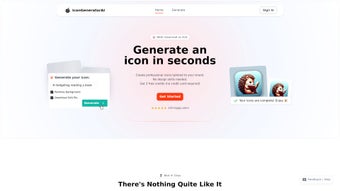
IconGeneratorAI is a cloud‑based graphic design platform that lets anyone – from seasoned designers to absolute beginners – generate custom, high‑resolution SVG icons in seconds. The service relies on a state‑of‑the‑art artificial‑intelligence engine that interprets plain‑language prompts, color palettes, and stylistic preferences to produce vector icons that are instantly ready for branding, UI design, marketing collateral, or mobile‑app interfaces. Because the entire workflow runs in a modern web browser, there is no need for heavyweight installations, and users can work from any device with an internet connection.
The platform also bundles additional utilities such as AI‑driven background removal, automatic image cropping, and one‑click SVG conversion, turning a simple raster image into a clean vector asset without manual tracing. With a flexible credit‑based pricing model, commercial‑usage rights included, and a 48‑hour refund guarantee, IconGeneratorAI aims to be a secure, cost‑effective alternative to hiring a freelance illustrator for routine icon work. Whether you are building a startup landing page, polishing an enterprise dashboard, or need a quick set of icons for a presentation, this tool promises speed, quality, and peace of mind.
Key Features That Distinguish IconGeneratorAI
The power of IconGeneratorAI lies in its blend of intuitive AI technology and practical design utilities. Below is a comprehensive list of the most valuable features, each explained in context so you can understand how they fit into a typical design workflow.
- AI‑Driven Prompt Engine: Type a natural‑language description like “minimalist cloud storage icon with a lock,” and the AI instantly translates the intent into a vector design, handling nuances such as style, perspective, and symbolism.
- Customizable Color & Style Palettes: Choose from curated themes or enter exact HEX codes (e.g., #1A73E8) to ensure brand consistency across all generated assets.
- High‑Resolution SVG Export: Every icon is delivered as a scalable vector graphic, guaranteeing pixel‑perfect clarity at any size—from favicon to billboard.
- AI Image Cropping & Background Removal: Upload existing PNG or JPG files; the AI isolates the foreground, removes backgrounds, and outputs a clean SVG ready for further editing.
- Multiple Variations Generator: For each prompt the system can produce up to five distinct versions, enabling rapid A/B testing or quick exploration of visual directions.
- Credit‑Based Pricing Model: Purchase credits in bundles (50, 500, 5,000) and spend them predictably—each icon generation or conversion consumes a known number of credits.
- Commercial Usage License: All assets come with royalty‑free commercial rights, allowing unlimited use in client projects, apps, and marketing materials.
- Refund Policy & Starter Credits: New users receive 10 free credits, and unsatisfactory results can be refunded within 48 hours, reducing financial risk.
- Seamless Integration with Design Tools: Exported SVGs can be directly imported into Figma, Sketch, Adobe XD, or other vector editors via downloadable links.
- Secure Cloud Processing: All AI computations run on encrypted servers that comply with GDPR, ensuring your prompts and uploaded images remain private.
Beyond the list, the platform’s UI is designed for speed: a single click generates the icon, and an inline editor lets you fine‑tune stroke weight, corner radius, or color shades without consuming extra credits. This combination of AI intelligence and manual control makes IconGeneratorAI a versatile tool for both rapid prototyping and final‑stage production.
Step‑by‑Step Installation & Usage Guide
1. Create Your Account and Load Credits
Visit IconGeneratorAI.com and click “Sign Up.” The registration requires only an email address and a strong password. After email verification, you’ll be taken to the dashboard where the “Credits” tab lets you purchase bundles via Stripe or PayPal. Every transaction is encrypted, and you receive an instant receipt via email.
2. Compose a Prompt and Select Design Parameters
From the dashboard, click “Create New Icon.” A modal appears with three primary fields: Prompt, Color, and Style. Enter a concise description (e.g., “flat camera icon with a shutter line”), pick a brand‑matching HEX color, and choose a style—Flat, Outline, 3D, or Hand‑drawn. The AI begins processing immediately, typically delivering results in 5‑12 seconds.
3. Review Generated Variations and Edit On‑the‑Fly
The system presents a grid of the main icon plus up to four alternatives. Click any thumbnail to open the lightweight vector editor, where you can adjust line thickness, modify colors, rotate the element, or add simple effects. All edits are saved instantly and do not consume additional credits, allowing iterative refinement without extra cost.
4. Export, Save, and Integrate
When you are satisfied, click “Download SVG.” The file is saved to your local device and can be opened in any vector program or embedded directly into HTML/CSS. For raster needs, a PNG export (2× or 4×) is also available with transparent background.
5. Advanced Workflow – Image Conversion & API Access
If you have an existing raster logo, select “Upload Image.” The AI isolates the foreground, strips the background, and outputs a clean SVG (costs one credit). For developers, an API key can be generated in the dashboard, enabling you to integrate IconGeneratorAI’s generation capabilities into your own SaaS product or internal design pipeline.
6. Manage Credits, Support, and Community
The “Dashboard” tracks credit balance, usage history, and pending refunds. Should you encounter any issues, the “Help Center” offers step‑by‑step tutorials, a community forum, and 24/7 live chat. The support team typically responds within minutes, ensuring uninterrupted workflow.
Compatibility, Pros & Cons, and Overall Value Assessment
Operating System Compatibility
Because IconGeneratorAI runs entirely in the browser, it is compatible with any modern operating system that supports HTML5 and JavaScript. This includes Windows 10/11, macOS Ventura, Linux distributions, as well as mobile platforms such as Android 13 and iOS 17. The only technical requirement is an up‑to‑date browser (Chrome, Firefox, Edge, or Safari) with cookies enabled for session management.
Pros
- Instant SVG output without manual tracing or third‑party plugins.
- Natural‑language prompt system lowers the learning curve for non‑designers.
- Flexible credit pricing suits freelancers, agencies, and occasional users alike.
- Royalty‑free commercial license included at no extra charge.
- Integrated background removal and image‑to‑SVG conversion streamline asset pipelines.
- GDPR‑compliant, encrypted cloud processing protects user data.
- API access expands functionality for developers and enterprises.
- Free starter credits let new users test the platform risk‑free.
Cons
- Requires an active internet connection; offline usage is not supported.
- High‑volume users may find credit bundles less cost‑effective than a traditional subscription model.
- Complex or ambiguous prompts can sometimes yield unexpected stylistic results, necessitating additional edits.
- While the editor is powerful for basic tweaks, advanced vector manipulation still requires a dedicated design tool.
Reviewer’s Verdict: IconGeneratorAI delivers a compelling blend of AI speed and design flexibility. For most routine icon projects—especially those with tight deadlines or limited budgets—the platform provides a fast, secure, and cost‑effective solution. The primary limitation is the reliance on an internet connection, but for the majority of web‑centric design teams this is a minor trade‑off. Overall, the value proposition, combined with commercial usage rights and a generous free‑credit starter pack, makes it a strong contender in the online graphics‑design space.
Frequently Asked Questions
How many credits does a single icon generation consume?
Generating one icon—including up to four variations—costs 1 credit. The same credit also covers the SVG export, so no additional deduction occurs during download.
Can I use the icons for commercial projects?
Yes. Every icon created with IconGeneratorAI comes with a royalty‑free commercial license, allowing unlimited use in client work, mobile apps, websites, and marketing campaigns.
What file formats are available for download?
The primary export format is SVG, which is fully scalable and editable. For quick raster needs, PNG (transparent background) is also offered at 2× or 4× resolution.
Is there a free trial or free credits?
New users receive a complimentary 10‑credit starter pack, enabling them to test the platform’s capabilities before committing to a purchase.
How does the refund process work?
If you are unsatisfied with a generated icon, you can request a refund for the unused portion of the credit within 48 hours. The support team reviews the request and restores the appropriate credit balance to your account.
Conclusion & Call to Action
IconGeneratorAI bridges the gap between sophisticated AI technology and everyday design needs. Its cloud‑based workflow eliminates the hassle of installing heavyweight software, while the credit‑based pricing model ensures you only pay for what you actually use. With commercial‑ready SVG output, integrated background removal, and secure, GDPR‑compliant processing, the platform stands out as a reliable, cost‑effective solution for freelancers, agencies, and in‑house design teams alike. Whether you’re looking to create a single logo‑icon or generate an entire icon set for a product suite, IconGeneratorAI provides the speed, quality, and flexibility required in today’s fast‑paced digital environment.
Ready to streamline your icon creation process? Download IconGeneratorAI now, claim your free starter credits, and start producing professional, brand‑consistent icons instantly.



.png)



